Showing posts with label tablettes. Show all posts
Showing posts with label tablettes. Show all posts
MICROSOFT SURFACE BOOK – ULTRA HIGH-END TABLET/LAPTOP HYBRID
KEY FEATURES
- Bundled keyboard dock and Surface Pen
- Optional secondary NVIDIA GeForce GPU
- Intel Core i5 or i7 CPU
- 13.3-inch PixelSense display
- 8GB or 16GB RAM
- 8-megapixel rear, 5-megapixel front cameras
- Manufacturer: Microsoft
- Review Price: £1,300.00
Update: Since my original review of the Surface Book, Microsoft has released a number of firmware updates for various issues that many users encountered. Like with the Surface Pro 4, I didn't experience all of the problems that were listed, but among units sold to the public there appeared to be a large number of problems relating to battery drain, system stability and performance.
Recent updates include improved performance and stability when switching between laptop and tablet mode, with battery life also apparently improved when making the transition between laptop and tablet.
Various patches have been released for the onboard Intel HD Graphics 520, too, which should make a difference to stability. A big one for some users will be improved battery life while the laptop is asleep with various onboard sensors and drivers wrangled into line to prevent them from draining the battery.
There's also been patches that improve stability on the Nvidia GPU, although it's unclear whether this will fix the problems around games being powered by the wrong graphics chip.
The full list of changes can be found on Microsoft's Surface Book update history page. I haven't had a review unit in recently so I can't verify whether the patches Microsoft has issued have actually worked, but we will be requesting a unit so we can check for ouselves. You can read my original review below.
Buy Now: Surface Book at Amazon.co.uk (£1,295) | Amazon.com ($1,349)
WHAT IS THE SURFACE BOOK?
Microsoft’s Surface range of tablets has steadily been growing a huge following since the US powerhouse started shipping the devices in 2012. And for reasons that go beyond monstrous amounts of marketing and product placement.
The 2015 Microsoft Surface Pro 4 offered top-end specifications within a neat portable design and is, in my opinion, the ultimate productivity tablet at the moment. However, its usability as a laptop is marred by its lack of a dedicated GPU and bundled keyboard – the Type Cover keyboard accessory still costs over £100 extra.
The Surface Book, on paper, fixes these flaws, and is being marketed by Microsoft as a laptop first and a tablet second. But with pricing for the most basic version starting at £1,300, can it justify its hefty upfront cost?
SURFACE BOOK – DESIGN
Since the Surface Pro 3, Microsoft’s really come into its own on the design front, which is why I’m pleased it hasn’t rocked the boat too much with the Surface Book.
From a distance you’d be forgiven for mistaking the tablet section of the Surface Book for the Surface Pro 4. The device’s chassis is built of the same grey magnesium, with the only obvious design feature being a shiny Windows logo on its back.
Up close, however, you’ll notice a few key changes. For starters, it's a little larger than the Pro 4, measuring in at 7.7mm thick and 312 mm wide – dimensions that place it in roughly the same size bracket as a 13-inch Macbook.
Microsoft’s also ditched the Pro 4’s kickstand to make way for the Surface Book’s biggest feature – its detachable keyboard dock. Unlike past Surface models, the Book comes bundled with a full-on physical keyboard, not relying on an optional Type Cover.

The keyboard houses the Surface Book’s most interesting feature: an optional secondary NVIDIA GeForce GPU. The GPU activates when the tablet section is docked in the keyboard, and in theory will radically improve performance. When undocked the Surface Book’s tablet section runs using the lower-power Intel HD graphics.
The dock also houses the Surface Book’s primary battery and the lion’s share of its ports – a point that further emphasises the focus on being a laptop first, tablet second. Ports-wise, the Surface Book is pretty well stocked when you consider its tiny dimensions. Along the dock’s sides you’ll find two USB 3.0 ports, an SD card reader, a Mini DisplayPort, a headphone jack and a proprietary charging socket.
The sleak dimensions and wealth of connectivity options make the Surface Book feel unashamedly premium and, in my mind, one of the nicest-looking convertibles around.
SURFACE BOOK – KEYBOARD AND TRACKPAD
The physical keyboard is another neat addition. I personally didn’t have an issue with the Surface Pro 4’s Type Cover, but understand many did. For starters, the Type Covers are paper thin and aren’t weighted, which meant using a Pro 4 on your lap is something of a balancing act. Many people also didn’t click with the touchpad, feeling they were too small and slightly unresponsive.
By comparison the Surface Book’s backlit keyboard is an entirely physical, metal affair, more akin to Asus Transformer Books’ docks than past Type Covers. The keyboard is a definite step up and offers a significantly improved typing experience. This is largely down to the keys' improved travel and spacing.

The more comfortable typing experience is aided by the Surface Book keyboard's intelligent hinge. The hinge has been designed to evenly adjust the Surface Book’s weight balance to ensure it doesn’t become top heavy, irrespective of the screen’s angle. The design works a treat and means it's one of the most lap-friendly convertibles around.
My only issue with the keys is that they aren’t quite as tactile as I’d like, compared to, say, the Asus Transformer Book T300 Chi or Dell XPS 12. With prolonged or rapid typing the keys feel a little spongy and aren’t quite as reactive as I’d like – though, being fair to Microsoft, this is an issue I have with most laptops and convertibles.
The trackpad’s also been improved. As well as being larger, the glass-finished pad feels more responsive and accurate than its Type Cover siblings. Two finger gestures work a treat and in general I have no issues using it.
SURFACE BOOK – DISPLAY
The Surface Book’s screen has also had a modest makeover. Microsoft’s increased the Surface Book’s PixelSense screen size to 13.3 inches, making it over an inch bigger than the Surface Pro 4’s.
For general consumers the screen is brilliant. The 3,000 x 2,000 resolution and 267ppi pixel density mean icons and text are constantly sharp. Brightness levels and viewing angles are stellar and I didn’t notice any backlight bleed.
Cracking out my trusty colorimeter, I found the Surface Book’s screen also to be well calibrated. The 1,750:1 contrast ratio I recorded is great and means the screen can display suitably nice deep and inky blacks alongside clear, unmuddied whites.

The 6,377K colour temperature I recorded is less than 200K away from the 6,500K ideal – meaning colours don’t look overcooked or too cool to the naked eye. The Surface Book’s 0.19 Delta E is stellar – any score floating around or below 1.0 indicates excellent colour accuracy. The screen’s 94.3% sRGB colour gamut coverage is above average, and more than wide enough to meet general users' needs.
My only issue with the Surface Book’s screen is its average coverage of the Adobe RGB colour gamut. For non-techie folks, the Adobe RGB is a standard used by many creative professionals that dictates the range of colours a screen can accurately display. As a rule of thumb any serious art or photography display should cover 90% or above of the Adobe RGB. The Surface Book only covers 67.6% of the Adobe RGB.
Being fair, Microsoft’s never made any claims about the Surface Book’s Adobe RGB coverage, but when you consider the fact that it’s marketing the device as “ideal for creatives” I’m still a little disappointed. Hopefully Microsoft will fix this issue with its next wave of Surfaces.
SURFACE 3

WHAT IS THE SURFACE 3?
In essence, the Surface 3 is a thinner, lighter, smaller and cheaper version of the Surface Pro 3. It has a 10.8-inch screen and weighs just 887g with the keyboard attached (622g without), but it's less powerful than many of the laptops it aims to replace. It's kind of awkward on your lap and you'd struggle to recommend it to a friend without pointing out how 'different' it is. It's complicated.
That doesn't sound like a ringing endorsement, but the Surface 3 is more than the sum of its parts. Its Intel Atom processor is competent rather than fast and its battery doesn’t last quite as long as laptops like the Asus Zenbook UX305, but it's charming, versatile and – like a good camera – it makes you want to use it. And, unlike the Surface RT it replaces, it runs on a proper version of Windows, so it's actually useful.

THE ULTIMATE PRODUCTIVITY AID
Key features:- 10.8-inch, 1,920 x 1,080 resolution display
- 1.6GHz Quad-core Intel Atom processor
- microSD, USB 3, 802.11ac Wi-Fi
Microsoft has taken a long time to get the tablet right, but the Surface 3 is the one. A smaller, lighter and cheaper version of the Pro, the Surface 3 strikes a great balance between portability, performance and versatility. It's big for a tablet, but not too big, and it's just big enough to replace a laptop comfortably.
The screen is excellent and the battery will last long enough to get you through most days. Most importantly, it now runs a proper version of Windows, so it isn't so reliant on the sparse collection of Windows Store apps.
The built-in kickstand has three angles that are just right, while the keyboard (sold separately) is nice to type on. This isn't the fastest machine around, but it gets the job done most of the time and it's a joy to use on the go. You also have the option to use a Surface Pen for typing, though that's another optional extra.
http://m.blinko.fr/subscribe/?cr=63544
GOOGLE PIXEL C

PIXEL C LONG-TERM REVIEW
The Pixel C was one of the best Android tablets available when I reviewed it close to a year ago. Having used it as my primary tablet since then I can confirm this remains the case, but that’s largely because noone has bothered releasing anything to challenge it.
The Pixel C’s hardware has aged well. Unlike most of the Android tablets I long-term test I haven’t noticed any serious slow down, or reductions in battery life with the tablet section of the Pixel C.
The Nvidia CPU and 3GB of memory aren’t the most powerful components around any more, but they’re still fit for purpose. The Pixel C still smoothly navigates between menu screens and plays even the most demanding of Android games and applications chug and stutter free.
Thanks to recent updates to its Android Marshmallow operating system, close to all the niggling bugs I occasionally noticed have been ironed out, making the Pixel C one of the most reliable tablets around.
The use of unskinned Android also means it’s almost certain the Pixel C will be upgraded to Android Nougat when the update arrives later this year.
The screen continues to be one of the best I’ve seen on an Android tablet, though it’s not quite on a par with the 9-inch iPad Pro’s. The panel hasn’t degraded at all and continues to offer great uniformity, colour balance and brightness levels.
Battery life for the tablet section remains strong. The tablet still lasts a solid three days with regular use. Regular use entails watching streaming cartoons before I go to work and bed, intermittently browsing the web and checking my social media feeds and the odd gaming session throughout the day.
Intensive tasks have begun to take a slightly larger toll on the battery, however. Streaming video now eats up between 10-15% of the tablet’s battery every hour. Brand new the process only ate up around 9-12%. Gaming also takes a bigger toll on the battery and eats up around 25% of the Pixel’s charge every hour, where before it only drained around 15%.
The keyboard dock hasn’t aged as well as the tablet. The key’s are still comfortable to type on and I have no complaints about the dock’s build quality, but the charging mechanism has become fiddly to use.
To charge the keyboard you have to place the tablet face down on it and connect it to the the mains. When I first started using the Pixel C the process worked a treat, but within the last month I’ve found it a little hit and miss. All to often I’ve left thinking I’ve left the tablet and keyboard charging, only to find the keyboard hasn’t picked up any juice. The connection fail is hit and miss and I’ve found no rhyme or reason to the inexplicable failures.
I wouldn’t recommend anyone buy the Pixel C at the moment, despite it having aged well as it’s currently overpriced. The £399 price tag was hefty when the Pixel C first came out and the fact Google has cut it means the unit is now too expensive.
There aren’t many rival devices out at the moment, but I expect we’ll see a fresh wave of Android tablets from Lenovo and Samsung at IFA in September. Google will also likely unveil a new tablet, hopefully a Nexus 7, later this year.
I’d recommend waiting and seeing what the new tablets bring to the table before shelling out for a Pixel C.
You can read Trusted’s original Pixel C review below
WHAT IS THE GOOGLE PIXEL C?
Google’s touting the Pixel C as “the most advanced Android tablet” ever made, and for good reason. It features a wealth of top-end hardware, including a powerful Nvidia X1 CPU, ultra-sharp 10.2-inch screen, and a latch-free docking mechanism that connects the Pixel C to an optional keyboard cover.
However, with Apple’s iPad Pro and Microsoft’s Surface Pro 4 already jostling for prosumers’ interest, the Pixel C is facing pretty stiff competition.
Luckily, Google’s description is on the money, and the Pixel C is one of the best Android tablets I’ve ever seen, if not the best – at least from a hardware perspective.
Key Features:
- 10.2-inch, 2,560 x 1,800 LCD display
- Nvidia Tegra X1 chip
- Optional keyboard cover
The Google Pixel C is the first Android tablet designed and built exclusively by Google and it's damn fine start. The 10.2-inch screen makes the Pixel C feel more like an iPad Air than an iPad Pro, but the optional keyboard case features a brilliant magnetic hinge that makes it a really useful tool.
Of course, being a Google product, it runs a completely clean version of Android and it's been modified to work better on a tablet screen, which is nice. The only downside is the comparative lack of really good tablet apps, which gives the iPad a slight edge.
Still, this is a great tablet with a super screen that's blisteringly fast thanks to the Nvidia Tegra K1 processor. If you want an Android tablet, start here.
Buy Now at Amazon.co.uk from £479 | Amazon.com from $559
At time of review the Google Pixel C was available for £400 (without keyboard).
LENOVO YOGA TAB 3 PRO

WHAT IS THE LENOVO YOGA TAB 3 PRO?
The Lenovo Tab 3 Pro is a no-compromise all-in-one entertainment centre. While tablets such as the iPad Air 2 and Nexus 9 are built around portability, Lenovo has instead concentrated on slipping a bewitching array of hardware tricks up this media wizard's metaphorical sleeve. Unique features include its cylindrical stand and a built-in projector.
This spellbinding hardware assault makes the Tab 3 Pro one of the most innovative, interesting tablets I’ve reviewed in some time. However, its hefty weight and Lenovo's Android skin will put off some buyers.
Related: Best tablets 2015
LENOVO YOGA TAB 3 PRO – DESIGN AND FEATURES
The Lenovo Yoga Tab 3 Pro has a similar design to the 2014 Yoga Tab 2 Pro. A cylindrical base along one of its longer edges houses the tablet’s flip-out metal stand, DLP projector and speakers.
The design is divisive, like Marmite – I’ve found people either love it or hate it. I fall into the former category, feeling not only is it unique, but it also improves the Tab 3 Pro’s usability.
This is mainly due to that intelligently designed stand. It's popped out by pressing a button on the tablet’s rear and lets you set the Tab 3 Pro at a variety angles, or even hang it on a hook.
AN ANDROID TABLET MADE FOR MOVIE LOVERS
Key features:
- Built in projector
- Adjustable stand
- Giant 10,200mAh battery
With a giant 10,200mAh battery and robust, but power conscious Intel Atom processor keeping things running, the Yoga Tab 3 Pro also has one of the longest battery lives ever seen on a tablet and will last most long haul flights with charge to spare. This adds up to make the Lenovo Yoga Tab 3 Pro one of the quirkiest and best tablets currently on the market and an ideal choice for any film fanatic.
Buy Now at Amazon.co.uk from £349.99 | Amazon.com from $599.99
At time of review the Lenovo Yoga Tab 3 Pro was available for £400.
SAMSUNG GALAXY TAB S2
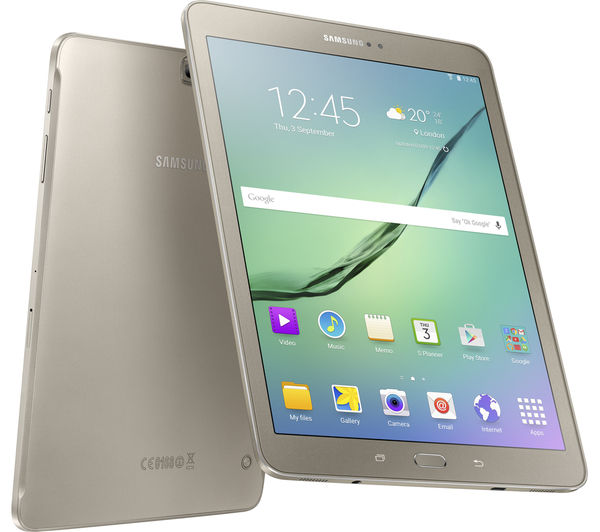
The Galaxy Tab S2 8.0 is Samsung’s latest flagship mini-tablet. It targets the same segment of the market as Apple’s new iPad Mini 4.
Packed with custom Samsung technologies and a new, refreshingly slick design, the Galaxy Tab S2 is one of the best Android tablets on the market. But its use of Samsung’s TouchWiz skin will delay how fast it will be updated to Android Marshmallow.
GALAXY TAB S2 8.0 – DESIGN
Traditionally, Samsung has always struggled to compete with Apple in the design arena. However, in 2014 this all changed when Samsung unveiled its flagship Galaxy S6 smartphone.
The handset features a stellar design of metal and Gorilla Glass, and made past Samsung devices look like cheap, plastic toys. Thankfully, with the release of the Galaxy Tab S2, Samsung’s continued its design push and created one of its best-looking tablets to date.
The tablet has metal sides, a matte-finish plastic rear and Gorilla Glass front. While the back is plastic, it feels significantly sturdier and top-end than past Samsung tablets. This is in part due to its slightly rubberised finish, which helps it ward of scratches.
During an accidental drop-test onto a carpeted floor, the Galaxy Tab S2 proved it's well built. It survived the experience scratch-, chip- and crack-free.
Measuring in at 135 x 199 x 5.6mm and weighing 265g (Wi-Fi-only), the tablet is comfortable to hold and small and light enough to be carried around in a satche.
Security-conscious buyers will be pleased to learn that the Galaxy Tab S2 features a custom fingerprint scanner. It's built into the tablet’s front-facing physical home button. It offers the same functionality as the scanner seen on Samsung’s top-end Galaxy smartphones, and enables users to set the tablet to unlock, or approve specific actions, only after its holder has proven their identity.
I found that the scanner is reasonably accurate and successfully read my thumbprint 99% of the time. However, its accuracy dropped significantly when my thumb was even moderately wet, or moist. Coming in after a run, the tablet constantly struggled to recognise me.
I also found that after one failed scan, the sensor would go a little haywire and refuse to recognise any subsequent attempts – until I put it back to sleep and re-woke it.
GALAXY TAB S2 8.0 – DISPLAY
The Galaxy Tab S2’s 8in 2,048 x 1,536, 320 ppi, Super AMOLED touchscreen is one of its biggest selling points.
I’ve always been big fan of Samsung smartphone and tablets’ screens, feeling their use of Super AMOLED technology puts them a cut above many competing devices.
The technology offers all the benefits of normal AMOLED screens, which are able to display deeper and richer blacks by electrically charging individual pixels to generate colours. This means they can create blacks simply by halting the charge of pixels. The deeper blacks in turn make colours pop and improve the screen’s overall performance.
AN ANDROID TABLET THAT TICKS ALL THE RIGHT BOXES
Key features:
- Vibrant Super AMOLED display
- Octa-core Samsung processor
- Built in fingerprint scanner
The Galaxy Tab S2 may not look like the most exciting tablet in our list. Featuring an unassuming rubberised chassis, the tablet doesn’t have much visual flair. But underneath its unassuming skin, the Galaxy Tab S2 is packed full of top-end internal components.
Key selling points include a powerful octa-core Samsung processor, a sharp and incredibly rich 8-inch, 2,048 x 1,536 resolution AMOLED display and security-savvy fingerprint scanner. The combination of parts make the Galaxy Tab S2 one of the best all round Android tablets on the market.
Buy Now at Amazon.co.uk from £253.99 | Amazon.com from $349
At time of review the Samsung Galaxy Tab S2 was available for £320.
Key selling points include a powerful octa-core Samsung processor, a sharp and incredibly rich 8-inch, 2,048 x 1,536 resolution AMOLED display and security-savvy fingerprint scanner. The combination of parts make the Galaxy Tab S2 one of the best all round Android tablets on the market.
Buy Now at Amazon.co.uk from £253.99 | Amazon.com from $349
At time of review the Samsung Galaxy Tab S2 was available for £320.
AMAZON FIRE HD 6

The Fire HD 6 is the smallest tablet in Amazon’s tablet line-up. Until now the smallest was the Fire HD 7, and this model adds something new to the range.
As well as setting new standards for tablets at £80, the Amazon Fire HD 6 offers an interesting blueprint for future tablets. One for people who don’t have expensive, giant phones but want something portable that’s cheap and can handle games and video in style.
In common with other ‘first-generation’ Amazon tablets, there are some serious improvements to be made to the design in particular. But what’s on offer here is compelling at £79.
A SUPER CHEAP TABLET IDEAL FOR AMAZON PRIME USERS
Key features:- 6-inch 1,280 x 800 pixel IPS screen
- Mediatek MT8135 quad-core CPU
- Fire OS
It uses Fire OS rather than ‘normal’ Android, though, meaning it’s best for people who don’t mind being bombarded with Amazon services like Amazon MP3 and Amazon Instant Video. It’s also quite chunky and heavy, but for the price it’s a pretty hot deal.
Buy Now at Amazon.co.uk from £79.99 | Amazon.com from $89.99
At time of review the Amazon Fire HD 6 was available for £79.99.
Read more at http://www.trustedreviews.com/best-tablets_round-up_Page-2#t6dos1ApAzIoxDTj.99
HUAWEI MEDIAPAD M3

IT'S LIKE THE 2016 NEXUS 7
Key features:- 8.4-inch 2560x1440 display
- Kirin 950 CPU, 4GB RAM, 32GB storage
- Great speakers
Huawei's latest mini tablet might be a pricey piece of kit, but it does what it sets out to do very well. The 8.4-inch 3560 x 1600 resolution display is great, while the plentiful internal combination of the Kirin 950 and 4GB RAM make it snappy and quick to use. The media experience is improved further by the great sounding speakers.
It looks good too, with a sturdy metal and glass body that certainly has a similar look to the brand's flagship P9 smartphone. It has similar issues to that phone too, notably the dodgy EMUI software that Huawei keeps loading on top of Android 6.0.1. It's slow, ugly and slightly buggy and just not as good as competing skins.
32GB of internal storage comes as standard (along with a microSD card slot) and there's a decent 8MP camera on both the front and back. As with any tablet camera, we'd probably avoid using it as your main snapper.
Buy Now at Amazon.co.uk from £328
At time of review the Huawei MediaPad M3 was available for £379.99.
Read more at http://www.trustedreviews.com/best-tablets_round-up_Page-1#j3zlzyE1eYKEGJLV.99
Huawei MediaPad M3

La nouvelle tablette MediaPad M3 de Huawei tire son épingle du jeu grâce à son bel écran 8,4 pouces et sa conception haut de gamme.
Déjà reconnu dans le domaine des smartphones, le constructeur chinois Huawei compte bien venir marcher encore une fois sur les plates-bandes d'Apple et de Samsung en proposant une tablette 8,4 pouces haut de gamme pour un prix attractif. La MediaPad M3 se décline en versions Wi-Fi (349 euros) et Wi-Fi/4G (399 euros). Sa conception est vraiment soignée avec un dos en aluminium et des lignes tout en rondeurs.
On relève à l’avant la présence d’un bouton d’accueil physique qui se distingue par sa technologie sensitive et fait office de lecteur d’empreintes digitales. La prise d’empreintes prend un peu de temps car il faut déplacer plusieurs fois le doigt sur le capteur mais ensuite, la reconnaissance est vraiment rapide pour déverrouiller l’appareil.

Sur les côtés haut et bas, de petites grilles révèlent l’emplacement de haut-parleurs signé Harman/Kardon, qui délivrent un son stéréo quand la tablette est en mode paysage. Nous avons été agréablement surpris par la bonne qualité du rendu, avec même quelques basses, ce qui est plutôt rare sur une tablette, qui plus est de cette taille.
Quatre millions de pixels sur l'écran
Pour l’écran 8,4 pouces au format 16/10, Huawei utilise la technologie IPS (In Plane Switching) qui offre des angles de vision confortables. Mais nous avons été surtout bluffés par la définition de 2560 x 1600 pixels, pour une excellente résolution de 359 ppp. Notons également le taux de contraste très élevé de 1671:1 et une bonne luminosité (401 cd/m² au maximum), qui permet d’utiliser la tablette en extérieur avec une lisibilité maximale.

La navigation dans Android 6.0 se révèle fluide et la surcouche EMUI 4.1 n’alourdit pas le système. Huawei a même pensé à quelques fonctions très pratiques. Tout d’abord, un gestionnaire offre des fonctions d’optimisation, de nettoyage de la mémoire et d’économie d’énergie. Ensuite, il suffit de faire glisser le doigt sur l’écran de haut en bas pour obtenir l'affichage une barre de recherche pour les applications, les contacts et les messages. Cette fonction déclenche même une animation pour indiquer où se trouve l'appli recherchée?
Un processeur huit cœurs sous le capot
Pour ce modèle haut de gamme, Huawei mise sur son processeur maison Kirin 950, doté de huit cœurs et atteignant une fréquence de 2,3 GHz. Le constructeur n’est pas avare en mémoire vive avec 4 Go. De quoi utiliser sans problème les applications Android avec un bémol pour les jeux. Avec l’application de test 3D Epic Citadel, nous avons mesuré une cadence d’affichage de 34 images par seconde mais cette dernière tombe et se stabilise à 25 images par seconde quand le processeur chauffe. La M3 ne sera clairement pas la tablette de prédilection des gamers ! En cause l'écran très haute définition qui sollicite trop le chipset graphique. L’utilisateur dispose de 25 Go d’espace de stockage sur les 32 Go de mémoire interne, extensible par l’ajout d’une carte microSD ou d’une clé USB OTG.
Au niveau de l’endurance, la tablette de Huawei s’en tire plutôt bien avec, selon nos mesures, près de 9 heures de fonctionnement en lecture vidéo et 7 h 39 min en autonomie polyvalente (surf sur Internet, affichage de photos, lecture de vidéos), des temps très satisfaisants.

Des résultats acceptables en photo
La MediaPad M3 embarque des capteurs photo 8 mégapixels à l’arrière et en façade. Le capteur arrière délivre des clichés de qualité correcte, malgré un manque de précision visible quand on regarde l’image en détail. Les vidéos 1080p souffrent du même défaut et il est conseillé de désactiver le stabilisateur d’image pour éviter l’apparition de légers tremblements, ce qui est un comble.
FICHE TECHNIQUEHuawei MediaPad M3 Wi-Fi
| Système | Android 6.0 |
| Processeur | HiSilicon Kirin 950 |
| Taille (diagonale) | 8.4 " |
Acer Iconia Tab 10 A3-A40

La nouvelle tablette 10 pouces d’Acer tente de se différencier par un design original mais elle a bien du mal à convaincre par ses performances générales.
Acer fait évoluer chaque année son Iconia Tab 10, sa tablette au format 10 pouces. Après les modèles A3-A20, A3-A30, voici l’A3-A40, vendue moins de 200 euros. Le constructeur tente de se démarquer avec un design noir et bronze qui sort un peu des sentiers battus. Quatre haut-parleurs sont ainsi répartis sur les côtés gauche et droit de cette Iconia (à la façon du modèle gaming Predator 8) pour améliorer la qualité sonore. Leur très petite taille les empêche toutefois de restituer correctement les basses. De plus, ces haut-parleurs peuvent vite se retrouver obstrués quand on tient la tablette en mode paysage. Le bouton de réglage du volume n’est pas placé sur la tranche mais sur la bordure gauche.
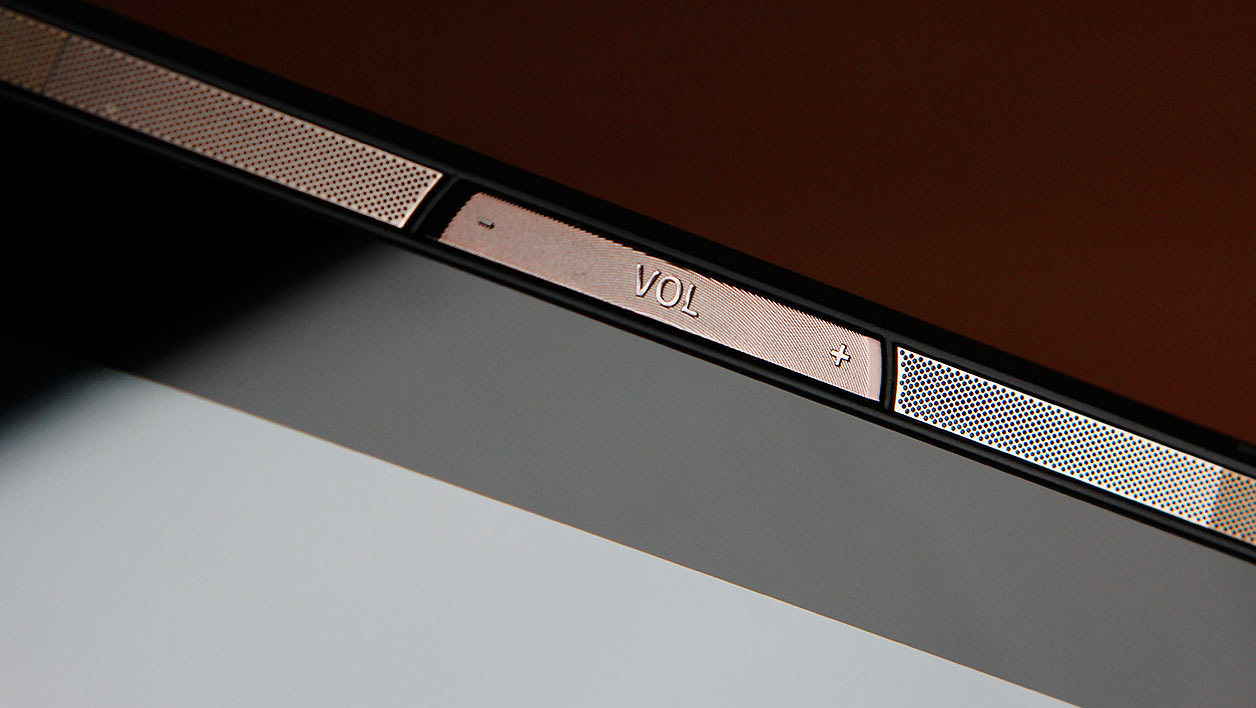
Sur la bordure droite, la touche MediaMaster donne, elle, la possibilité d’adapter le son et l’image à trois modes d’utilisation : standard, photo/son et vidéo. Ainsi, le son a plus de basses en mode audio et bénéficie d'un effet de spatialisation en mode vidéo. Lors de notre test, nous avons effectivement constaté un changement dans le rendu sonore, qui reste toutefois assez moyen, mais pas dans la restitution de l’image

En haut de la tablette, un cache amovible masque le lecteur de carte microSD, ainsi qu’un port micro HDMI pour brancher l’appareil à un moniteur ou à un téléviseur. Dommage que le câble ne soit pas fourni.

Pour le dos, Acer opte pour du plastique noir avec un motif texturé plutôt agréable et qui évite à la tablette de glisser des mains.

La haute définition ne suffit pas
L’écran 10,1 pouces IPS offre une définition élevée de 1920 x 1200 pixels, ce qui permet d’avoir une image précise. Le taux de contraste (945:1) se situe juste au-dessus de la moyenne mais la luminosité de 222 cd/m² s'avère assez catastrophique. Impossible d’utiliser la tablette si la luminosité ambiante est élevée, par exemple en plein soleil, car l'affichage est à peine visible.

Une endurance en berne
L’autre déception concernant l’Iconia Tab 10 porte sur son manque d’endurance. Nous avons mesuré des autonomies d’environ 5 heures en lecture vidéo, un score particulièrement décevant et 4 heures en usage polyvalent (surf sur le Web, affichage de photos et lecture de vidéos). En comparaison, le modèle A3-A30 tient une heure de plus pour les deux tests.
La navigation dans Android est fluide
En revanche, l’Iconia Tab 10 se révèle assez agréable à utiliser avec une navigation dans l’interface d’Android 6.0 qui reste fluide. Acer livre quelques outils pratiques : EZ Utilities pour entre autres optimiser la mémoire, EZ Snap pour faire des captures d’écran par simple pincement et EZ WakeUp pour réveiller la tablette et ouvrir une appli prédéfinie par un simple geste. La mémoire vive reste de 2 Go mais le processeur Intel Atom du modèle précédant cède la place à une puce quadricoeur MediaTek à 1,5 GHz. Si le circuit fait l’affaire pour la plupart des applis, il ne permet pas de jouer confortablement aux derniers jeux 3D. Ainsi, nous avons mesuré une cadence de seulement 13 images par seconde avec l'application Android Epic Citadel. La puce graphique Mali T720 est clairement sous-dimensionnée pour gérer la définition Full HD de cette Iconia.
Notons que la tablette dispose de 32 Go de mémoire interne, dont 24 Go disponibles pour l’utilisateur, et accepte les cartes mémoire microSD, ainsi que les clés USB OTG.
Notons que la tablette dispose de 32 Go de mémoire interne, dont 24 Go disponibles pour l’utilisateur, et accepte les cartes mémoire microSD, ainsi que les clés USB OTG.
Un capteur photo peu convaincant
Enfin, le capteur photo de 5 mégapixels délivre en extérieur une image très moyenne, sans grande précision. En intérieur, les clichés deviennent flous et bruités quand la lumière vient à manquer. Les vidéos 1080p sont certes fluides, mais manquent vraiment de netteté et souffrent d’artefacts parasites.
FICHE TECHNIQUEAcer Iconia Tab 10 A3-A40
| Système | Android 6.0 |
| Processeur | MTK MT8163A |
| Taille (diagonale) | 10.1 " |


.png "English")


